mirror of
https://github.com/dockur/macos.git
synced 2026-03-11 08:34:24 +00:00
Compare commits
No commits in common. "master" and "v1.08" have entirely different histories.
24 changed files with 304 additions and 889 deletions
|
|
@ -1,19 +0,0 @@
|
|||
{
|
||||
"name": "macOS 15 (Sequoia)",
|
||||
"service": "macos",
|
||||
"containerEnv": {
|
||||
"VERSION": "15"
|
||||
},
|
||||
"forwardPorts": [8006],
|
||||
"portsAttributes": {
|
||||
"8006": {
|
||||
"label": "Web",
|
||||
"onAutoForward": "notify"
|
||||
}
|
||||
},
|
||||
"otherPortsAttributes": {
|
||||
"onAutoForward": "ignore"
|
||||
},
|
||||
"dockerComposeFile": "../codespaces.yml",
|
||||
"initializeCommand": "docker system prune --all --force"
|
||||
}
|
||||
|
|
@ -1,19 +0,0 @@
|
|||
{
|
||||
"name": "macOS 13 (Ventura)",
|
||||
"service": "macos",
|
||||
"containerEnv": {
|
||||
"VERSION": "13"
|
||||
},
|
||||
"forwardPorts": [8006],
|
||||
"portsAttributes": {
|
||||
"8006": {
|
||||
"label": "Web",
|
||||
"onAutoForward": "notify"
|
||||
}
|
||||
},
|
||||
"otherPortsAttributes": {
|
||||
"onAutoForward": "ignore"
|
||||
},
|
||||
"dockerComposeFile": "../codespaces.yml",
|
||||
"initializeCommand": "docker system prune --all --force"
|
||||
}
|
||||
|
|
@ -1,19 +0,0 @@
|
|||
{
|
||||
"name": "macOS 12 (Monterey)",
|
||||
"service": "macos",
|
||||
"containerEnv": {
|
||||
"VERSION": "12"
|
||||
},
|
||||
"forwardPorts": [8006],
|
||||
"portsAttributes": {
|
||||
"8006": {
|
||||
"label": "Web",
|
||||
"onAutoForward": "notify"
|
||||
}
|
||||
},
|
||||
"otherPortsAttributes": {
|
||||
"onAutoForward": "ignore"
|
||||
},
|
||||
"dockerComposeFile": "../codespaces.yml",
|
||||
"initializeCommand": "docker system prune --all --force"
|
||||
}
|
||||
|
|
@ -1,19 +0,0 @@
|
|||
{
|
||||
"name": "macOS 11 (Big Sur)",
|
||||
"service": "macos",
|
||||
"containerEnv": {
|
||||
"VERSION": "11"
|
||||
},
|
||||
"forwardPorts": [8006],
|
||||
"portsAttributes": {
|
||||
"8006": {
|
||||
"label": "Web",
|
||||
"onAutoForward": "notify"
|
||||
}
|
||||
},
|
||||
"otherPortsAttributes": {
|
||||
"onAutoForward": "ignore"
|
||||
},
|
||||
"dockerComposeFile": "../codespaces.yml",
|
||||
"initializeCommand": "docker system prune --all --force"
|
||||
}
|
||||
|
|
@ -1,19 +0,0 @@
|
|||
{
|
||||
"name": "macOS 10 (Catalina)",
|
||||
"service": "macos",
|
||||
"containerEnv": {
|
||||
"VERSION": "10"
|
||||
},
|
||||
"forwardPorts": [8006],
|
||||
"portsAttributes": {
|
||||
"8006": {
|
||||
"label": "Web",
|
||||
"onAutoForward": "notify"
|
||||
}
|
||||
},
|
||||
"otherPortsAttributes": {
|
||||
"onAutoForward": "ignore"
|
||||
},
|
||||
"dockerComposeFile": "../codespaces.yml",
|
||||
"initializeCommand": "docker system prune --all --force"
|
||||
}
|
||||
|
|
@ -1,21 +0,0 @@
|
|||
services:
|
||||
macos:
|
||||
container_name: macos
|
||||
image: ghcr.io/dockur/macos
|
||||
environment:
|
||||
RAM_SIZE: "half"
|
||||
DISK_SIZE: "max"
|
||||
CPU_CORES: "max"
|
||||
devices:
|
||||
- /dev/kvm
|
||||
- /dev/net/tun
|
||||
cap_add:
|
||||
- NET_ADMIN
|
||||
ports:
|
||||
- 8006:8006
|
||||
- 5900:5900/tcp
|
||||
- 5900:5900/udp
|
||||
volumes:
|
||||
- ./macos:/storage
|
||||
restart: on-failure
|
||||
stop_grace_period: 2m
|
||||
|
|
@ -1,19 +0,0 @@
|
|||
{
|
||||
"name": "macOS 14 (Sonoma)",
|
||||
"service": "macos",
|
||||
"containerEnv": {
|
||||
"VERSION": "14"
|
||||
},
|
||||
"forwardPorts": [8006],
|
||||
"portsAttributes": {
|
||||
"8006": {
|
||||
"label": "Web",
|
||||
"onAutoForward": "notify"
|
||||
}
|
||||
},
|
||||
"otherPortsAttributes": {
|
||||
"onAutoForward": "ignore"
|
||||
},
|
||||
"dockerComposeFile": "codespaces.yml",
|
||||
"initializeCommand": "docker system prune --all --force"
|
||||
}
|
||||
|
|
@ -1,5 +1,4 @@
|
|||
.dockerignore
|
||||
.devcontainer
|
||||
.git
|
||||
.github
|
||||
.gitignore
|
||||
|
|
|
|||
2
.github/ISSUE_TEMPLATE/1-issue.yml
vendored
2
.github/ISSUE_TEMPLATE/1-issue.yml
vendored
|
|
@ -21,7 +21,6 @@ body:
|
|||
attributes:
|
||||
label: Docker compose
|
||||
description: The compose file (or otherwise the `docker run` command used).
|
||||
render: yaml
|
||||
validations:
|
||||
required: true
|
||||
- type: textarea
|
||||
|
|
@ -29,7 +28,6 @@ body:
|
|||
attributes:
|
||||
label: Docker log
|
||||
description: The logfile of the container (as shown by `docker logs macos`).
|
||||
render: shell
|
||||
validations:
|
||||
required: true
|
||||
- type: textarea
|
||||
|
|
|
|||
2
.github/ISSUE_TEMPLATE/3-bug.yml
vendored
2
.github/ISSUE_TEMPLATE/3-bug.yml
vendored
|
|
@ -23,7 +23,6 @@ body:
|
|||
attributes:
|
||||
label: Docker compose
|
||||
description: The compose file (or otherwise the `docker run` command used).
|
||||
render: yaml
|
||||
validations:
|
||||
required: true
|
||||
- type: textarea
|
||||
|
|
@ -31,7 +30,6 @@ body:
|
|||
attributes:
|
||||
label: Docker log
|
||||
description: The logfile of the container (as shown by `docker logs macos`).
|
||||
render: shell
|
||||
validations:
|
||||
required: true
|
||||
- type: textarea
|
||||
|
|
|
|||
16
.github/workflows/build.yml
vendored
16
.github/workflows/build.yml
vendored
|
|
@ -2,6 +2,16 @@ name: Build
|
|||
|
||||
on:
|
||||
workflow_dispatch:
|
||||
push:
|
||||
branches:
|
||||
- master
|
||||
paths-ignore:
|
||||
- '**/*.md'
|
||||
- '**/*.yml'
|
||||
- '.gitignore'
|
||||
- '.dockerignore'
|
||||
- '.github/**'
|
||||
- '.github/workflows/**'
|
||||
|
||||
concurrency:
|
||||
group: build
|
||||
|
|
@ -22,7 +32,7 @@ jobs:
|
|||
steps:
|
||||
-
|
||||
name: Checkout
|
||||
uses: actions/checkout@v6
|
||||
uses: actions/checkout@v4
|
||||
with:
|
||||
fetch-depth: 0
|
||||
-
|
||||
|
|
@ -40,7 +50,7 @@ jobs:
|
|||
labels: |
|
||||
org.opencontainers.image.title=${{ vars.NAME }}
|
||||
env:
|
||||
DOCKER_METADATA_ANNOTATIONS_LEVELS: manifest
|
||||
DOCKER_METADATA_ANNOTATIONS_LEVELS: manifest,index
|
||||
-
|
||||
name: Set up Docker Buildx
|
||||
uses: docker/setup-buildx-action@v3
|
||||
|
|
@ -64,7 +74,7 @@ jobs:
|
|||
context: .
|
||||
push: true
|
||||
provenance: false
|
||||
platforms: linux/amd64
|
||||
platforms: linux/amd64,linux/arm64
|
||||
tags: ${{ steps.meta.outputs.tags }}
|
||||
labels: ${{ steps.meta.outputs.labels }}
|
||||
annotations: ${{ steps.meta.outputs.annotations }}
|
||||
|
|
|
|||
11
.github/workflows/check.yml
vendored
11
.github/workflows/check.yml
vendored
|
|
@ -7,19 +7,14 @@ jobs:
|
|||
name: shellcheck
|
||||
runs-on: ubuntu-latest
|
||||
steps:
|
||||
- uses: actions/checkout@v6
|
||||
- uses: actions/checkout@v4
|
||||
- name: Run ShellCheck
|
||||
uses: ludeeus/action-shellcheck@master
|
||||
env:
|
||||
SHELLCHECK_OPTS: -x --source-path=src -e SC1091 -e SC2001 -e SC2002 -e SC2034 -e SC2064 -e SC2153 -e SC2317 -e SC2028
|
||||
- name: Lint Dockerfile
|
||||
uses: hadolint/hadolint-action@v3.3.0
|
||||
uses: hadolint/hadolint-action@v3.1.0
|
||||
with:
|
||||
dockerfile: Dockerfile
|
||||
ignore: DL3008,DL3018,DL3020,DL3029,DL3059
|
||||
ignore: DL3008,DL3020,DL3029,DL3059
|
||||
failure-threshold: warning
|
||||
-
|
||||
name: Validate JSON and YML files
|
||||
uses: GrantBirki/json-yaml-validate@v4
|
||||
with:
|
||||
yaml_exclude_regex: ".*\\kubernetes\\.yml$"
|
||||
|
|
|
|||
22
.github/workflows/hub.yml
vendored
22
.github/workflows/hub.yml
vendored
|
|
@ -12,15 +12,13 @@ jobs:
|
|||
dockerHubDescription:
|
||||
runs-on: ubuntu-latest
|
||||
steps:
|
||||
-
|
||||
name: Checkout repo
|
||||
uses: actions/checkout@v6
|
||||
-
|
||||
name: Docker Hub Description
|
||||
uses: peter-evans/dockerhub-description@v5
|
||||
with:
|
||||
username: ${{ secrets.DOCKERHUB_USERNAME }}
|
||||
password: ${{ secrets.DOCKERHUB_TOKEN }}
|
||||
repository: ${{ secrets.DOCKERHUB_REPO }}
|
||||
short-description: ${{ github.event.repository.description }}
|
||||
readme-filepath: ./readme.md
|
||||
- uses: actions/checkout@v4
|
||||
-
|
||||
name: Docker Hub Description
|
||||
uses: peter-evans/dockerhub-description@v4
|
||||
with:
|
||||
username: ${{ secrets.DOCKERHUB_USERNAME }}
|
||||
password: ${{ secrets.DOCKERHUB_TOKEN }}
|
||||
repository: ${{ secrets.DOCKERHUB_REPO }}
|
||||
short-description: ${{ github.event.repository.description }}
|
||||
readme-filepath: ./readme.md
|
||||
|
|
|
|||
66
.github/workflows/review.yml
vendored
66
.github/workflows/review.yml
vendored
|
|
@ -1,66 +0,0 @@
|
|||
on:
|
||||
pull_request:
|
||||
|
||||
name: "Review"
|
||||
|
||||
permissions:
|
||||
contents: read
|
||||
pull-requests: write
|
||||
checks: write
|
||||
|
||||
jobs:
|
||||
review:
|
||||
name: review
|
||||
runs-on: ubuntu-latest
|
||||
steps:
|
||||
-
|
||||
name: Checkout
|
||||
uses: actions/checkout@v6
|
||||
-
|
||||
name: Spelling
|
||||
uses: reviewdog/action-misspell@v1
|
||||
with:
|
||||
locale: "US"
|
||||
level: warning
|
||||
pattern: |
|
||||
*.md
|
||||
*.sh
|
||||
reporter: github-pr-review
|
||||
github_token: ${{ secrets.GITHUB_TOKEN }}
|
||||
-
|
||||
name: Hadolint
|
||||
uses: reviewdog/action-hadolint@v1
|
||||
with:
|
||||
level: warning
|
||||
reporter: github-pr-review
|
||||
hadolint_ignore: DL3008 DL3018 DL3020 DL3029 DL3059
|
||||
github_token: ${{ secrets.GITHUB_TOKEN }}
|
||||
-
|
||||
name: YamlLint
|
||||
uses: reviewdog/action-yamllint@v1
|
||||
with:
|
||||
level: warning
|
||||
reporter: github-pr-review
|
||||
github_token: ${{ secrets.GITHUB_TOKEN }}
|
||||
-
|
||||
name: ActionLint
|
||||
uses: reviewdog/action-actionlint@v1
|
||||
with:
|
||||
level: warning
|
||||
reporter: github-pr-review
|
||||
github_token: ${{ secrets.GITHUB_TOKEN }}
|
||||
-
|
||||
name: Shellformat
|
||||
uses: reviewdog/action-shfmt@v1
|
||||
with:
|
||||
level: warning
|
||||
shfmt_flags: "-i 2 -ci -bn"
|
||||
github_token: ${{ secrets.GITHUB_TOKEN }}
|
||||
-
|
||||
name: Shellcheck
|
||||
uses: reviewdog/action-shellcheck@v1
|
||||
with:
|
||||
level: warning
|
||||
reporter: github-pr-review
|
||||
shellcheck_flags: -x -e SC1091 -e SC2001 -e SC2002 -e SC2034 -e SC2064 -e SC2153 -e SC2317 -e SC2028
|
||||
github_token: ${{ secrets.GITHUB_TOKEN }}
|
||||
5
.github/workflows/test.yml
vendored
5
.github/workflows/test.yml
vendored
|
|
@ -1,6 +1,11 @@
|
|||
on:
|
||||
workflow_dispatch:
|
||||
pull_request:
|
||||
paths:
|
||||
- '**/*.sh'
|
||||
- '.github/workflows/test.yml'
|
||||
- '.github/workflows/check.yml'
|
||||
- 'Dockerfile'
|
||||
|
||||
name: "Test"
|
||||
permissions: {}
|
||||
|
|
|
|||
62
Dockerfile
62
Dockerfile
|
|
@ -1,23 +1,6 @@
|
|||
# syntax=docker/dockerfile:1
|
||||
FROM --platform=linux/amd64 debian:trixie-slim AS builder
|
||||
|
||||
FROM --platform=$BUILDPLATFORM alpine:3.22 AS builder
|
||||
|
||||
ARG VERSION_OPENCORE="1.0.4"
|
||||
ARG REPO_OPENCORE="https://github.com/acidanthera/OpenCorePkg"
|
||||
ADD $REPO_OPENCORE/releases/download/$VERSION_OPENCORE/OpenCore-$VERSION_OPENCORE-RELEASE.zip /tmp/opencore.zip
|
||||
|
||||
RUN apk --update --no-cache add unzip && \
|
||||
unzip /tmp/opencore.zip -d /tmp/oc && \
|
||||
cp /tmp/oc/Utilities/macserial/macserial.linux /macserial && \
|
||||
rm -rf /tmp/* /var/tmp/* /var/cache/apk/*
|
||||
|
||||
FROM scratch AS runner
|
||||
COPY --from=qemux/qemu:7.29 / /
|
||||
|
||||
ARG VERSION_ARG="0.0"
|
||||
ARG VERSION_KVM_OPENCORE="v21"
|
||||
ARG VERSION_OSX_KVM="326053dd61f49375d5dfb28ee715d38b04b5cd8e"
|
||||
ARG REPO_OSX_KVM="https://raw.githubusercontent.com/kholia/OSX-KVM"
|
||||
ARG REPO_KVM_OPENCORE="https://github.com/thenickdude/KVM-Opencore"
|
||||
|
||||
ARG DEBCONF_NOWARNINGS="yes"
|
||||
|
|
@ -27,29 +10,58 @@ ARG DEBCONF_NONINTERACTIVE_SEEN="true"
|
|||
RUN set -eu && \
|
||||
apt-get update && \
|
||||
apt-get --no-install-recommends -y install \
|
||||
fdisk \
|
||||
mtools && \
|
||||
apt-get clean && \
|
||||
rm -rf /var/lib/apt/lists/* /tmp/* /var/tmp/*
|
||||
|
||||
COPY --chmod=755 ./src/build.sh /run
|
||||
COPY --chmod=644 ./config.plist /run
|
||||
|
||||
ADD $REPO_KVM_OPENCORE/releases/download/$VERSION_KVM_OPENCORE/OpenCore-$VERSION_KVM_OPENCORE.iso.gz /tmp/opencore.iso.gz
|
||||
|
||||
RUN gzip -d /tmp/opencore.iso.gz && \
|
||||
run/build.sh /tmp/opencore.iso /run/config.plist && \
|
||||
rm -rf /tmp/*
|
||||
|
||||
FROM scratch AS runner
|
||||
COPY --from=qemux/qemu-docker:5.18 / /
|
||||
|
||||
ARG VERSION_ARG="0.0"
|
||||
ARG VERSION_OPENCORE="1.0.0"
|
||||
ARG VERSION_OSX_KVM="326053dd61f49375d5dfb28ee715d38b04b5cd8e"
|
||||
|
||||
ARG REPO_OSX_KVM="https://raw.githubusercontent.com/kholia/OSX-KVM"
|
||||
ARG REPO_OPENCORE="https://raw.githubusercontent.com/acidanthera/OpenCorePkg"
|
||||
|
||||
ARG DEBCONF_NOWARNINGS="yes"
|
||||
ARG DEBIAN_FRONTEND="noninteractive"
|
||||
ARG DEBCONF_NONINTERACTIVE_SEEN="true"
|
||||
|
||||
RUN set -eu && \
|
||||
apt-get update && \
|
||||
apt-get --no-install-recommends -y install \
|
||||
python3 && \
|
||||
apt-get clean && \
|
||||
echo "$VERSION_ARG" > /run/version && \
|
||||
rm -rf /var/lib/apt/lists/* /tmp/* /var/tmp/*
|
||||
|
||||
COPY --chmod=755 ./src /run/
|
||||
COPY --chmod=755 ./assets /assets/
|
||||
COPY --chmod=755 --from=builder /macserial /usr/local/bin/
|
||||
COPY --chmod=644 --from=builder /images /images
|
||||
|
||||
ADD --chmod=755 $REPO_OPENCORE/$VERSION_OPENCORE/Utilities/macrecovery/macrecovery.py /run/
|
||||
ADD --chmod=644 \
|
||||
$REPO_OSX_KVM/$VERSION_OSX_KVM/OVMF_CODE.fd \
|
||||
$REPO_OSX_KVM/$VERSION_OSX_KVM/OVMF_VARS.fd \
|
||||
$REPO_OSX_KVM/$VERSION_OSX_KVM/OVMF_VARS-1024x768.fd \
|
||||
$REPO_OSX_KVM/$VERSION_OSX_KVM/OVMF_VARS-1920x1080.fd /usr/share/OVMF/
|
||||
|
||||
ADD $REPO_KVM_OPENCORE/releases/download/$VERSION_KVM_OPENCORE/OpenCore-$VERSION_KVM_OPENCORE.iso.gz /opencore.iso.gz
|
||||
|
||||
EXPOSE 8006 5900
|
||||
VOLUME /storage
|
||||
EXPOSE 5900 8006
|
||||
|
||||
ENV VERSION="14"
|
||||
ENV RAM_SIZE="4G"
|
||||
ENV CPU_CORES="1"
|
||||
ENV CPU_CORES="2"
|
||||
ENV DISK_SIZE="64G"
|
||||
ENV VERSION="ventura"
|
||||
|
||||
ENTRYPOINT ["/usr/bin/tini", "-s", "/run/entry.sh"]
|
||||
|
|
|
|||
|
|
@ -1,19 +1,15 @@
|
|||
services:
|
||||
macos:
|
||||
osx:
|
||||
image: dockurr/macos
|
||||
container_name: macos
|
||||
environment:
|
||||
VERSION: "14"
|
||||
VERSION: "ventura"
|
||||
devices:
|
||||
- /dev/kvm
|
||||
- /dev/net/tun
|
||||
cap_add:
|
||||
- NET_ADMIN
|
||||
ports:
|
||||
- 8006:8006
|
||||
- 5900:5900/tcp
|
||||
- 5900:5900/udp
|
||||
volumes:
|
||||
- ./macos:/storage
|
||||
restart: always
|
||||
stop_grace_period: 2m
|
||||
|
|
|
|||
102
kubernetes.yml
102
kubernetes.yml
|
|
@ -1,86 +1,72 @@
|
|||
---
|
||||
apiVersion: v1
|
||||
kind: PersistentVolumeClaim
|
||||
metadata:
|
||||
name: macos-pvc
|
||||
spec:
|
||||
accessModes:
|
||||
- ReadWriteOnce
|
||||
- ReadWriteOnce
|
||||
resources:
|
||||
requests:
|
||||
storage: 64Gi
|
||||
---
|
||||
apiVersion: apps/v1
|
||||
kind: Deployment
|
||||
apiVersion: v1
|
||||
kind: Pod
|
||||
metadata:
|
||||
name: macos
|
||||
labels:
|
||||
name: macos
|
||||
spec:
|
||||
replicas: 1
|
||||
selector:
|
||||
matchLabels:
|
||||
app: macos
|
||||
template:
|
||||
metadata:
|
||||
labels:
|
||||
app: macos
|
||||
spec:
|
||||
containers:
|
||||
- name: macos
|
||||
image: dockurr/macos
|
||||
env:
|
||||
- name: VERSION
|
||||
value: "14"
|
||||
terminationGracePeriodSeconds: 120 # the Kubernetes default is 30 seconds and it may be not enough
|
||||
containers:
|
||||
- name: macos
|
||||
image: dockurr/macos
|
||||
ports:
|
||||
- containerPort: 8006
|
||||
protocol: TCP
|
||||
- containerPort: 5000
|
||||
protocol: TCP
|
||||
- containerPort: 5000
|
||||
protocol: UDP
|
||||
securityContext:
|
||||
privileged: true
|
||||
env:
|
||||
- name: RAM_SIZE
|
||||
value: 4G
|
||||
- name: CPU_CORES
|
||||
value: "2"
|
||||
- name: DISK_SIZE
|
||||
value: "64G"
|
||||
ports:
|
||||
- containerPort: 8006
|
||||
name: http
|
||||
protocol: TCP
|
||||
- containerPort: 5900
|
||||
name: vnc
|
||||
protocol: TCP
|
||||
securityContext:
|
||||
capabilities:
|
||||
add:
|
||||
- NET_ADMIN
|
||||
privileged: true
|
||||
volumeMounts:
|
||||
volumeMounts:
|
||||
- mountPath: /storage
|
||||
name: storage
|
||||
- mountPath: /dev/kvm
|
||||
name: dev-kvm
|
||||
- mountPath: /dev/net/tun
|
||||
name: dev-tun
|
||||
terminationGracePeriodSeconds: 120
|
||||
volumes:
|
||||
- name: storage
|
||||
persistentVolumeClaim:
|
||||
claimName: macos-pvc
|
||||
- hostPath:
|
||||
path: /dev/kvm
|
||||
name: dev-kvm
|
||||
- hostPath:
|
||||
path: /dev/net/tun
|
||||
type: CharDevice
|
||||
name: dev-tun
|
||||
volumes:
|
||||
- name: storage
|
||||
persistentVolumeClaim:
|
||||
claimName: macos-pvc
|
||||
- name: dev-kvm
|
||||
hostPath:
|
||||
path: /dev/kvm
|
||||
---
|
||||
apiVersion: v1
|
||||
kind: Service
|
||||
metadata:
|
||||
name: macos
|
||||
spec:
|
||||
internalTrafficPolicy: Cluster
|
||||
ports:
|
||||
- name: http
|
||||
port: 8006
|
||||
protocol: TCP
|
||||
targetPort: 8006
|
||||
- name: vnc
|
||||
port: 5900
|
||||
protocol: TCP
|
||||
targetPort: 5900
|
||||
type: NodePort
|
||||
selector:
|
||||
app: macos
|
||||
type: ClusterIP
|
||||
name: macos
|
||||
ports:
|
||||
- name: tcp-8006
|
||||
protocol: TCP
|
||||
port: 8006
|
||||
targetPort: 8006
|
||||
- name: tcp-5900
|
||||
protocol: TCP
|
||||
port: 5900
|
||||
targetPort: 5900
|
||||
- name: udp-5900
|
||||
protocol: UDP
|
||||
port: 5900
|
||||
targetPort: 5900
|
||||
|
|
|
|||
176
readme.md
176
readme.md
|
|
@ -1,4 +1,4 @@
|
|||
<h1 align="center">macOS<br />
|
||||
<h1 align="center">OSX<br />
|
||||
<div align="center">
|
||||
<a href="https://github.com/dockur/macos/"><img src="https://github.com/dockur/macos/raw/master/.github/logo.png" title="Logo" style="max-width:100%;" width="128" /></a>
|
||||
</div>
|
||||
|
|
@ -12,7 +12,7 @@
|
|||
|
||||
</div></h1>
|
||||
|
||||
MacOS inside a Docker container.
|
||||
OSX (macOS) inside a Docker container.
|
||||
|
||||
## Features ✨
|
||||
|
||||
|
|
@ -22,7 +22,7 @@ MacOS inside a Docker container.
|
|||
|
||||
## Usage 🐳
|
||||
|
||||
##### Via Docker Compose:
|
||||
Via Docker Compose:
|
||||
|
||||
```yaml
|
||||
services:
|
||||
|
|
@ -30,85 +30,67 @@ services:
|
|||
image: dockurr/macos
|
||||
container_name: macos
|
||||
environment:
|
||||
VERSION: "14"
|
||||
VERSION: "ventura"
|
||||
devices:
|
||||
- /dev/kvm
|
||||
- /dev/net/tun
|
||||
cap_add:
|
||||
- NET_ADMIN
|
||||
ports:
|
||||
- 8006:8006
|
||||
- 5900:5900/tcp
|
||||
- 5900:5900/udp
|
||||
volumes:
|
||||
- ./macos:/storage
|
||||
restart: always
|
||||
stop_grace_period: 2m
|
||||
```
|
||||
|
||||
##### Via Docker CLI:
|
||||
Via Docker CLI:
|
||||
|
||||
```bash
|
||||
docker run -it --rm --name macos -e "VERSION=14" -p 8006:8006 --device=/dev/kvm --device=/dev/net/tun --cap-add NET_ADMIN -v "${PWD:-.}/macos:/storage" --stop-timeout 120 docker.io/dockurr/macos
|
||||
docker run -it --rm -p 8006:8006 --device=/dev/kvm --cap-add NET_ADMIN --stop-timeout 120 dockurr/macos
|
||||
```
|
||||
|
||||
##### Via Kubernetes:
|
||||
Via Kubernetes:
|
||||
|
||||
```shell
|
||||
kubectl apply -f https://raw.githubusercontent.com/dockur/macos/refs/heads/master/kubernetes.yml
|
||||
kubectl apply -f kubernetes.yml
|
||||
```
|
||||
|
||||
##### Via Github Codespaces:
|
||||
|
||||
[](https://codespaces.new/dockur/macos)
|
||||
|
||||
## FAQ 💬
|
||||
|
||||
### How do I use it?
|
||||
|
||||
Very simple! These are the steps:
|
||||
|
||||
- Start the container and connect to [port 8006](http://127.0.0.1:8006/) using your web browser.
|
||||
- Start the container and connect to [port 8006](http://localhost:8006) using your web browser.
|
||||
|
||||
- Choose `Disk Utility` and then select the largest `Apple Inc. VirtIO Block Media` disk.
|
||||
|
||||
- Click the `Erase` button to format the disk to APFS, and give it any name you like.
|
||||
- Click the `Erase` button to format the disk, and give it any recognizable name you like.
|
||||
|
||||
- Close the current window and proceed the installation by clicking `Reinstall macOS`.
|
||||
|
||||
- When prompted where you want to install it, select the disk you created previously.
|
||||
- When prompted where you want to install it, select the disk you just created previously.
|
||||
|
||||
- After all files are copied, select your region, language, and keyboard settings.
|
||||
|
||||
- When the `Migration Assistant` wants to transfer data, select `Not now` (bottom left).
|
||||
|
||||
- On the `Apple ID` screen, select `Set Up Later` (bottom left) and then proceed using `Skip`.
|
||||
- After all files are copied, select your region, language, and account settings.
|
||||
|
||||
- On the `Create a Computer Account` screen, fill in a username and password and `Continue`.
|
||||
|
||||
Enjoy your brand new machine, and don't forget to star this repo!
|
||||
|
||||
### How do I select the version of macOS?
|
||||
### How do I select the macOS version?
|
||||
|
||||
By default, macOS 14 (Sonoma) will be installed, but you can add the `VERSION` environment variable in order to specify an alternative:
|
||||
By default, macOS Ventura will be installed. But you can add the `VERSION` environment variable to your compose file, in order to specify an alternative macOS version to be downloaded:
|
||||
|
||||
```yaml
|
||||
environment:
|
||||
VERSION: "15"
|
||||
VERSION: "ventura"
|
||||
```
|
||||
|
||||
Select from the values below:
|
||||
|
||||
| **Value** | **Version** | **Name** |
|
||||
|-------------|----------------|------------------|
|
||||
| `15` | macOS 15 | Sequoia |
|
||||
| `14` | macOS 14 | Sonoma |
|
||||
| `13` | macOS 13 | Ventura |
|
||||
| `12` | macOS 12 | Monterey |
|
||||
| `11` | macOS 11 | Big Sur |
|
||||
|
||||
> [!NOTE]
|
||||
> Support for macOS 15 (Sequoia) is still in its infancy, as it does not allow you to sign in to your Apple Account yet.
|
||||
| **Value** | **Version** |
|
||||
|----|-----|
|
||||
| `sonoma` | macOS Sonoma |
|
||||
| `ventura` | macOS Ventura |
|
||||
| `monterey` | macOS Monterey |
|
||||
| `big-sur` | macOS Big Sur |
|
||||
|
||||
### How do I change the storage location?
|
||||
|
||||
|
|
@ -116,10 +98,10 @@ kubectl apply -f https://raw.githubusercontent.com/dockur/macos/refs/heads/maste
|
|||
|
||||
```yaml
|
||||
volumes:
|
||||
- ./macos:/storage
|
||||
- /var/osx:/storage
|
||||
```
|
||||
|
||||
Replace the example path `./macos` with the desired storage folder or named volume.
|
||||
Replace the example path `/var/osx` with the desired storage folder.
|
||||
|
||||
### How do I change the size of the disk?
|
||||
|
||||
|
|
@ -135,7 +117,7 @@ kubectl apply -f https://raw.githubusercontent.com/dockur/macos/refs/heads/maste
|
|||
|
||||
### How do I change the amount of CPU or RAM?
|
||||
|
||||
By default, macOS will be allowed to use a single CPU core and 4 GB of RAM.
|
||||
By default, the container will be allowed to use a maximum of 2 CPU cores and 4 GB of RAM.
|
||||
|
||||
If you want to adjust this, you can specify the desired amount using the following environment variables:
|
||||
|
||||
|
|
@ -145,73 +127,6 @@ kubectl apply -f https://raw.githubusercontent.com/dockur/macos/refs/heads/maste
|
|||
CPU_CORES: "4"
|
||||
```
|
||||
|
||||
> [!IMPORTANT]
|
||||
> If your system has an AMD processor (instead of Intel), it is not advisable to enable multiple cores before the installation is completed and you have verified that everything runs stable for a while. Because in many cases it will introduce issues, which are difficult to pinpoint if you do not have experience with its behavior on a single core first.
|
||||
|
||||
### How do I assign an individual IP address to the container?
|
||||
|
||||
By default, the container uses bridge networking, which shares the IP address with the host.
|
||||
|
||||
If you want to assign an individual IP address to the container, you can create a macvlan network as follows:
|
||||
|
||||
```bash
|
||||
docker network create -d macvlan \
|
||||
--subnet=192.168.0.0/24 \
|
||||
--gateway=192.168.0.1 \
|
||||
--ip-range=192.168.0.100/28 \
|
||||
-o parent=eth0 vlan
|
||||
```
|
||||
|
||||
Be sure to modify these values to match your local subnet.
|
||||
|
||||
Once you have created the network, change your compose file to look as follows:
|
||||
|
||||
```yaml
|
||||
services:
|
||||
macos:
|
||||
container_name: macos
|
||||
..<snip>..
|
||||
networks:
|
||||
vlan:
|
||||
ipv4_address: 192.168.0.100
|
||||
|
||||
networks:
|
||||
vlan:
|
||||
external: true
|
||||
```
|
||||
|
||||
An added benefit of this approach is that you won't have to perform any port mapping anymore, since all ports will be exposed by default.
|
||||
|
||||
> [!IMPORTANT]
|
||||
> This IP address won't be accessible from the Docker host due to the design of macvlan, which doesn't permit communication between the two. If this is a concern, you need to create a [second macvlan](https://blog.oddbit.com/post/2018-03-12-using-docker-macvlan-networks/#host-access) as a workaround.
|
||||
|
||||
### How can macOS acquire an IP address from my router?
|
||||
|
||||
After configuring the container for [macvlan](#how-do-i-assign-an-individual-ip-address-to-the-container), it is possible for macOS to become part of your home network by requesting an IP from your router, just like your other devices.
|
||||
|
||||
To enable this mode, in which the container and macOS will have separate IP addresses, add the following lines to your compose file:
|
||||
|
||||
```yaml
|
||||
environment:
|
||||
DHCP: "Y"
|
||||
devices:
|
||||
- /dev/vhost-net
|
||||
device_cgroup_rules:
|
||||
- 'c *:* rwm'
|
||||
```
|
||||
|
||||
### How do I pass-through a disk?
|
||||
|
||||
It is possible to pass-through disk devices or partitions directly by adding them to your compose file in this way:
|
||||
|
||||
```yaml
|
||||
devices:
|
||||
- /dev/sdb:/disk1
|
||||
- /dev/sdc1:/disk2
|
||||
```
|
||||
|
||||
Use `/disk1` if you want it to become your main drive, and use `/disk2` and higher to add them as secondary drives.
|
||||
|
||||
### How do I pass-through a USB device?
|
||||
|
||||
To pass-through a USB device, first lookup its vendor and product id via the `lsusb` command, then add them to your compose file like this:
|
||||
|
|
@ -223,59 +138,31 @@ kubectl apply -f https://raw.githubusercontent.com/dockur/macos/refs/heads/maste
|
|||
- /dev/bus/usb
|
||||
```
|
||||
|
||||
### How do I share files with the host?
|
||||
|
||||
To share files with the host, add the following volume to your compose file:
|
||||
|
||||
```yaml
|
||||
volumes:
|
||||
- ./example:/shared
|
||||
```
|
||||
|
||||
Then start macOS and execute the following command:
|
||||
|
||||
```shell
|
||||
sudo -S mount_9p shared
|
||||
```
|
||||
|
||||
In Finder’s menu bar, click on “Go – Computer” to access this shared folder, it will show the contents of `./example`.
|
||||
|
||||
### How do I verify if my system supports KVM?
|
||||
|
||||
First check if your software is compatible using this chart:
|
||||
|
||||
| **Product** | **Linux** | **Win11** | **Win10** | **macOS** |
|
||||
|---|---|---|---|---|
|
||||
| Docker CLI | ✅ | ✅ | ❌ | ❌ |
|
||||
| Docker Desktop | ❌ | ✅ | ❌ | ❌ |
|
||||
| Podman CLI | ✅ | ✅ | ❌ | ❌ |
|
||||
| Podman Desktop | ✅ | ✅ | ❌ | ❌ |
|
||||
|
||||
After that you can run the following commands in Linux to check your system:
|
||||
To verify that your system supports KVM, run the following commands:
|
||||
|
||||
```bash
|
||||
sudo apt install cpu-checker
|
||||
sudo kvm-ok
|
||||
```
|
||||
|
||||
If you receive an error from `kvm-ok` indicating that KVM cannot be used, please check whether:
|
||||
If you receive an error from `kvm-ok` indicating that KVM acceleration can't be used, please check whether:
|
||||
|
||||
- the virtualization extensions (`Intel VT-x` or `AMD SVM`) are enabled in your BIOS.
|
||||
|
||||
- you are running an operating system that supports them, like Linux or Windows 11 (macOS and Windows 10 do not unfortunately).
|
||||
|
||||
- you enabled "nested virtualization" if you are running the container inside a virtual machine.
|
||||
|
||||
- you are not using a cloud provider, as most of them do not allow nested virtualization for their VPS's.
|
||||
|
||||
If you did not receive any error from `kvm-ok` but the container still complains about a missing KVM device, it could help to add `privileged: true` to your compose file (or `sudo` to your `docker` command) to rule out any permission issue.
|
||||
If you didn't receive any error from `kvm-ok` at all, but the container still complains that `/dev/kvm` is missing, it might help to add `privileged: true` to your compose file (or `--privileged` to your `run` command), to rule out any permission issue.
|
||||
|
||||
### How do I run Windows in a container?
|
||||
|
||||
You can use [dockur/windows](https://github.com/dockur/windows) for that. It shares many of the same features, and even has completely automatic installation.
|
||||
|
||||
### How do I run a Linux desktop in a container?
|
||||
|
||||
You can use [qemus/qemu](https://github.com/qemus/qemu) in that case.
|
||||
|
||||
### Is this project legal?
|
||||
|
||||
Yes, this project contains only open-source code and does not distribute any copyrighted material. Neither does it try to circumvent any copyright protection measures. So under all applicable laws, this project will be considered legal.
|
||||
|
|
@ -284,7 +171,7 @@ kubectl apply -f https://raw.githubusercontent.com/dockur/macos/refs/heads/maste
|
|||
|
||||
## Acknowledgements 🙏
|
||||
|
||||
Special thanks to [seitenca](https://github.com/seitenca), this project would not exist without her invaluable work.
|
||||
Special thanks to [seitenca](https://github.com/seitenca), [OpenCore](https://github.com/acidanthera/OpenCorePkg), [OSX-KVM](https://github.com/kholia/OSX-KVM) and [KVM-Opencore](https://github.com/thenickdude/KVM-Opencore), this project would not exist without their invaluable work.
|
||||
|
||||
## Stars 🌟
|
||||
[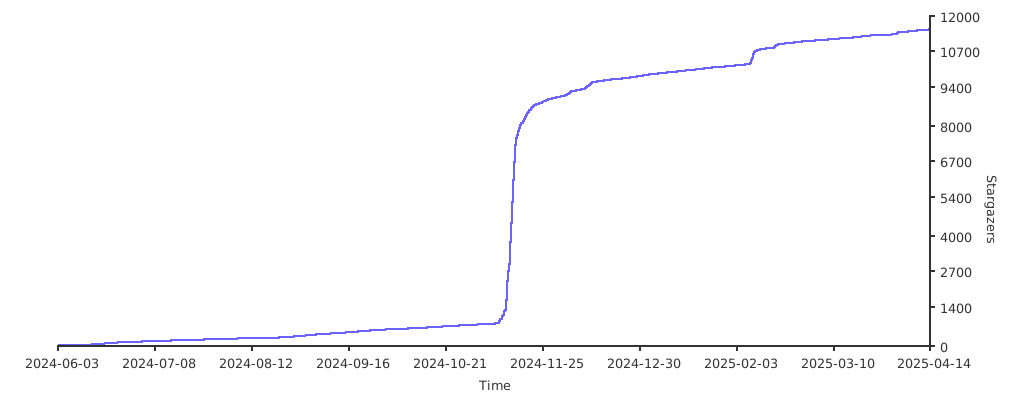](https://starchart.cc/dockur/macos)
|
||||
|
|
@ -302,4 +189,5 @@ Special thanks to [seitenca](https://github.com/seitenca), this project would no
|
|||
[Size]: https://img.shields.io/docker/image-size/dockurr/macos/latest?color=066da5&label=size
|
||||
[Pulls]: https://img.shields.io/docker/pulls/dockurr/macos.svg?style=flat&label=pulls&logo=docker
|
||||
[Version]: https://img.shields.io/docker/v/dockurr/macos/latest?arch=amd64&sort=semver&color=066da5
|
||||
[Package]: https://img.shields.io/badge/dynamic/json?url=https%3A%2F%2Fipitio.github.io%2Fbackage%2Fdockur%2Fmacos%2Fmacos.json&query=%24.downloads&logo=github&style=flat&color=066da5&label=pulls
|
||||
[Package]:
|
||||
https://img.shields.io/badge/dynamic/json?url=https%3A%2F%2Fraw.githubusercontent.com%2Fipitio%2Fbackage%2Fmaster%2Findex%2Fdockur%2Fmacos%2Fmacos.json&query=%24.downloads&logo=github&style=flat&color=066da5&label=pulls
|
||||
|
|
|
|||
212
src/boot.sh
212
src/boot.sh
|
|
@ -2,32 +2,34 @@
|
|||
set -Eeuo pipefail
|
||||
|
||||
# Docker environment variables
|
||||
: "${SECURE:="off"}" # Secure boot
|
||||
: "${BOOT_MODE:="macos"}" # Boot mode
|
||||
: "${BOOT_MODE:="full"}" # Boot mode
|
||||
|
||||
BOOT_DESC=""
|
||||
BOOT_OPTS=""
|
||||
SECURE="off"
|
||||
OVMF="/usr/share/OVMF"
|
||||
|
||||
msg="Configuring boot..."
|
||||
html "$msg"
|
||||
[[ "$DEBUG" == [Yy1]* ]] && echo "$msg"
|
||||
|
||||
case "${HEIGHT,,}" in
|
||||
"1080" )
|
||||
case "${BOOT_MODE,,}" in
|
||||
"full" )
|
||||
DEST="$PROCESS"
|
||||
BOOT_DESC=" 1920x1080"
|
||||
ROM="OVMF_CODE.fd"
|
||||
VARS="OVMF_VARS-1920x1080.fd"
|
||||
;;
|
||||
"768" )
|
||||
"hd" )
|
||||
DEST="${PROCESS}_hd"
|
||||
BOOT_DESC=" 1024x768"
|
||||
ROM="OVMF_CODE.fd"
|
||||
VARS="OVMF_VARS-1024x768.fd"
|
||||
;;
|
||||
*)
|
||||
"default" )
|
||||
BOOT_DESC=""
|
||||
ROM="OVMF_CODE.fd"
|
||||
VARS="OVMF_VARS.fd"
|
||||
DEST="${PROCESS}_${HEIGHT}"
|
||||
DEST="${PROCESS}_default"
|
||||
;;
|
||||
*)
|
||||
error "Unknown BOOT_MODE, value \"${BOOT_MODE}\" is not recognized!" && exit 33
|
||||
;;
|
||||
esac
|
||||
|
||||
|
|
@ -45,161 +47,49 @@ DEST="$STORAGE/$DEST"
|
|||
|
||||
if [ ! -s "$DEST.rom" ] || [ ! -f "$DEST.rom" ]; then
|
||||
[ ! -s "$OVMF/$ROM" ] || [ ! -f "$OVMF/$ROM" ] && error "UEFI boot file ($OVMF/$ROM) not found!" && exit 44
|
||||
if [[ "${LOGO:-}" == [Nn]* ]]; then
|
||||
cp "$OVMF/$ROM" "$DEST.tmp"
|
||||
else
|
||||
if ! /run/utk.bin "$OVMF/$ROM" replace_ffs LogoDXE "/var/www/img/${PROCESS,,}.ffs" save "$DEST.tmp"; then
|
||||
warn "failed to add custom logo to BIOS!"
|
||||
cp "$OVMF/$ROM" "$DEST.tmp"
|
||||
fi
|
||||
fi
|
||||
mv "$DEST.tmp" "$DEST.rom"
|
||||
! setOwner "$DEST.rom" && error "Failed to set the owner for \"$DEST.rom\" !"
|
||||
cp "$OVMF/$ROM" "$DEST.rom"
|
||||
fi
|
||||
|
||||
if [ ! -s "$DEST.vars" ] || [ ! -f "$DEST.vars" ]; then
|
||||
[ ! -s "$OVMF/$VARS" ] || [ ! -f "$OVMF/$VARS" ]&& error "UEFI vars file ($OVMF/$VARS) not found!" && exit 45
|
||||
cp "$OVMF/$VARS" "$DEST.tmp"
|
||||
mv "$DEST.tmp" "$DEST.vars"
|
||||
! setOwner "$DEST.vars" && error "Failed to set the owner for \"$DEST.vars\" !"
|
||||
cp "$OVMF/$VARS" "$DEST.vars"
|
||||
fi
|
||||
|
||||
BOOT_OPTS+=" -drive if=pflash,format=raw,readonly=on,file=$DEST.rom"
|
||||
BOOT_OPTS+=" -drive if=pflash,format=raw,file=$DEST.vars"
|
||||
|
||||
IMG="$STORAGE/boot.img"
|
||||
|
||||
if [ ! -f "$IMG" ]; then
|
||||
|
||||
FILE="OpenCore.img"
|
||||
IMG="/tmp/$FILE"
|
||||
rm -f "$IMG"
|
||||
|
||||
# OpenCoreBoot
|
||||
ISO="/opencore.iso"
|
||||
OUT="/tmp/extract"
|
||||
|
||||
rm -rf "$OUT"
|
||||
mkdir -p "$OUT"
|
||||
|
||||
msg="Building boot image"
|
||||
info "$msg..." && html "$msg..."
|
||||
|
||||
[ ! -f "$ISO" ] && gzip -dk "$ISO.gz"
|
||||
|
||||
if [ ! -f "$ISO" ] || [ ! -s "$ISO" ]; then
|
||||
error "Could not find image file \"$ISO\"." && exit 10
|
||||
fi
|
||||
|
||||
START=$(sfdisk -l "$ISO" | grep -i -m 1 "EFI System" | awk '{print $2}')
|
||||
mcopy -bspmQ -i "$ISO@@${START}S" ::EFI "$OUT"
|
||||
|
||||
CFG="$OUT/EFI/OC/config.plist"
|
||||
|
||||
PLIST="/assets/config.plist"
|
||||
[ -f "/config.plist" ] && PLIST="/config.plist"
|
||||
|
||||
cp "$PLIST" "$CFG"
|
||||
|
||||
ROM="${MAC//[^[:alnum:]]/}"
|
||||
ROM="${ROM,,}"
|
||||
BROM=$(echo "$ROM" | xxd -r -p | base64)
|
||||
RESOLUTION="${WIDTH}x${HEIGHT}@32"
|
||||
|
||||
sed -r -i -e 's|<data>m7zhIYfl</data>|<data>'"${BROM}"'</data>|g' "$CFG"
|
||||
sed -r -i -e 's|<string>iMacPro1,1</string>|<string>'"${MODEL}"'</string>|g' "$CFG"
|
||||
sed -r -i -e 's|<string>C02TM2ZBHX87</string>|<string>'"${SN}"'</string>|g' "$CFG"
|
||||
sed -r -i -e 's|<string>C02717306J9JG361M</string>|<string>'"${MLB}"'</string>|g' "$CFG"
|
||||
sed -r -i -e 's|<string>1920x1080@32</string>|<string>'"${RESOLUTION}"'</string>|g' "$CFG"
|
||||
sed -r -i -e 's|<string>007076A6-F2A2-4461-BBE5-BAD019F8025A</string>|<string>'"${UUID}"'</string>|g' "$CFG"
|
||||
|
||||
# Build image
|
||||
|
||||
MB=256
|
||||
CLUSTER=4
|
||||
START=2048
|
||||
SECTOR=512
|
||||
FIRST_LBA=34
|
||||
|
||||
SIZE=$(( MB*1024*1024 ))
|
||||
OFFSET=$(( START*SECTOR ))
|
||||
TOTAL=$(( SIZE-(FIRST_LBA*SECTOR) ))
|
||||
LAST_LBA=$(( TOTAL/SECTOR ))
|
||||
COUNT=$(( LAST_LBA-(START-1) ))
|
||||
|
||||
if ! truncate -s "$SIZE" "$IMG"; then
|
||||
rm -f "$IMG"
|
||||
error "Could not allocate space to create image $IMG ." && exit 11
|
||||
fi
|
||||
|
||||
PART="/tmp/partition.fdisk"
|
||||
|
||||
{ echo "label: gpt"
|
||||
echo "label-id: 1ACB1E00-3B8F-4B2A-86A4-D99ED21DCAEB"
|
||||
echo "device: $FILE"
|
||||
echo "unit: sectors"
|
||||
echo "first-lba: $FIRST_LBA"
|
||||
echo "last-lba: $LAST_LBA"
|
||||
echo "sector-size: $SECTOR"
|
||||
echo ""
|
||||
echo "${FILE}1 : start=$START, size=$COUNT, type=C12A7328-F81F-11D2-BA4B-00A0C93EC93B, uuid=05157F6E-0AE8-4D1A-BEA5-AC172453D02C, name=\"primary\""
|
||||
|
||||
} > "$PART"
|
||||
|
||||
sfdisk -q "$IMG" < "$PART"
|
||||
echo "drive c: file=\"$IMG\" partition=0 offset=$OFFSET" > /etc/mtools.conf
|
||||
|
||||
mformat -F -M "$SECTOR" -c "$CLUSTER" -T "$COUNT" -v "EFI" "C:"
|
||||
mcopy -bspmQ "$OUT/EFI" "C:"
|
||||
|
||||
rm -rf "$OUT"
|
||||
|
||||
info ""
|
||||
info "Model: $MODEL"
|
||||
info "Rom: $ROM"
|
||||
info "Serial: $SN"
|
||||
info "Board: $MLB"
|
||||
info ""
|
||||
# OpenCoreBoot
|
||||
BOOT_DRIVE_ID="OpenCore"
|
||||
BOOT_DRIVE="$STORAGE/boot.img"
|
||||
BOOT_VERSION="$STORAGE/boot.version"
|
||||
BOOT_FILE="/images/OpenCore.img.gz"
|
||||
BOOT_SIZE=$(stat -c%s "$BOOT_FILE")
|
||||
|
||||
CURRENT_SIZE=""
|
||||
if [ -f "$BOOT_VERSION" ]; then
|
||||
CURRENT_SIZE=$(<"$BOOT_VERSION")
|
||||
fi
|
||||
|
||||
! setOwner "$IMG" && error "Failed to set the owner for \"$IMG\" !"
|
||||
if [ "$CURRENT_SIZE" != "$BOOT_SIZE" ]; then
|
||||
rm -f "$BOOT_DRIVE" 2>/dev/null || true
|
||||
fi
|
||||
|
||||
BOOT_DRIVE_ID="OpenCore"
|
||||
if [ ! -f "$BOOT_DRIVE" ] || [ ! -s "$BOOT_DRIVE" ]; then
|
||||
msg="Extracting boot image"
|
||||
info "$msg..." && html "$msg..."
|
||||
gzip -dkc "$BOOT_FILE" > "$BOOT_DRIVE"
|
||||
echo "$BOOT_SIZE" > "$BOOT_VERSION"
|
||||
fi
|
||||
|
||||
DISK_OPTS+=" -device virtio-blk-pci,drive=${BOOT_DRIVE_ID},bus=pcie.0,addr=0x5,bootindex=$BOOT_INDEX"
|
||||
DISK_OPTS+=" -drive file=$IMG,id=$BOOT_DRIVE_ID,format=raw,cache=unsafe,readonly=on,if=none"
|
||||
DISK_OPTS+=" -device virtio-blk-pci,drive=${BOOT_DRIVE_ID},scsi=off,bus=pcie.0,addr=0x5,bootindex=$BOOT_INDEX"
|
||||
DISK_OPTS+=" -drive file=$BOOT_DRIVE,id=$BOOT_DRIVE_ID,format=raw,cache=unsafe,readonly=on,if=none"
|
||||
|
||||
CPU_VENDOR=$(lscpu | awk '/Vendor ID/{print $3}')
|
||||
DEFAULT_FLAGS="vendor=GenuineIntel,vmx=off,vmware-cpuid-freq=on,-pdpe1gb"
|
||||
|
||||
if [[ "$CPU_VENDOR" == "AuthenticAMD" || "${KVM:-}" == [Nn]* ]]; then
|
||||
|
||||
if [ -z "${CPU_MODEL:-}" ]; then
|
||||
|
||||
case "${VERSION,,}" in
|
||||
"ventura" | "13"* )
|
||||
CPU_MODEL="Haswell-noTSX" ;;
|
||||
"monterey" | "12"* )
|
||||
CPU_MODEL="Haswell-noTSX" ;;
|
||||
"bigsur" | "big-sur" | "11"* )
|
||||
CPU_MODEL="Haswell-noTSX" ;;
|
||||
"catalina" | "10"* )
|
||||
CPU_MODEL="Haswell-noTSX" ;;
|
||||
*)
|
||||
CPU_MODEL="Skylake-Client-v4"
|
||||
DEFAULT_FLAGS+=",-spec-ctrl"
|
||||
;;
|
||||
esac
|
||||
|
||||
fi
|
||||
|
||||
if [[ "${KVM:-}" == [Nn]* ]] || [[ "${ARCH,,}" != "amd64" ]] || [[ "$OSTYPE" =~ ^darwin ]]; then
|
||||
DEFAULT_FLAGS+=",-pcid,-tsc-deadline,-invpcid,-xsavec,-xsaves,+ssse3,+sse4.2,+popcnt,+avx,+avx2,+aes,+fma,+bmi1,+bmi2,+smep,+xsave,+xsaveopt,+xgetbv1,+movbe,+rdrand,check"
|
||||
else
|
||||
DEFAULT_FLAGS+=",+pcid,+ssse3,+sse4.2,+popcnt,+avx,+avx2,+aes,+fma,+bmi1,+bmi2,+smep,+xsave,+xsavec,+xsaves,+xsaveopt,+xgetbv1,+movbe,+rdrand,check"
|
||||
fi
|
||||
DEFAULT_FLAGS="vendor=GenuineIntel,vmware-cpuid-freq=on,-pdpe1gb"
|
||||
|
||||
if [[ "$CPU_VENDOR" != "GenuineIntel" ]] || [[ "${KVM:-}" == [Nn]* ]]; then
|
||||
[ -z "${CPU_MODEL:-}" ] && CPU_MODEL="Haswell-noTSX"
|
||||
DEFAULT_FLAGS+=",+pcid,+ssse3,+sse4.2,+popcnt,+avx,+avx2,+aes,+fma,+bmi1,+bmi2,+smep,+xsave,+xsavec,+xsaveopt,+xgetbv1,+movbe,+rdrand,check"
|
||||
fi
|
||||
|
||||
if [ -z "${CPU_FLAGS:-}" ]; then
|
||||
|
|
@ -208,34 +98,12 @@ else
|
|||
CPU_FLAGS="$DEFAULT_FLAGS,$CPU_FLAGS"
|
||||
fi
|
||||
|
||||
SM_BIOS=""
|
||||
CLOCKSOURCE="tsc"
|
||||
[[ "${ARCH,,}" == "arm64" ]] && CLOCKSOURCE="arch_sys_counter"
|
||||
CLOCK="/sys/devices/system/clocksource/clocksource0/current_clocksource"
|
||||
|
||||
if [ ! -f "$CLOCK" ]; then
|
||||
warn "file \"$CLOCK\" cannot not found?"
|
||||
else
|
||||
result=$(<"$CLOCK")
|
||||
result="${result//[![:print:]]/}"
|
||||
case "${result,,}" in
|
||||
"${CLOCKSOURCE,,}" )
|
||||
if [[ "$CPU_VENDOR" == "GenuineIntel" && "$CPU_CORES" == "1" && "${KVM:-}" != [Nn]* ]]; then
|
||||
CPU_CORES="2"
|
||||
fi ;;
|
||||
"kvm-clock" ) warn "Nested KVM virtualization detected, this might cause issues running macOS!" ;;
|
||||
"hyperv_clocksource_tsc_page" ) info "Nested Hyper-V virtualization detected, this might cause issues running macOS!" ;;
|
||||
"hpet" ) warn "unsupported clock source detected: '$result'. Please set host clock source to '$CLOCKSOURCE', otherwise it will cause issues running macOS!" ;;
|
||||
*) warn "unexpected clock source detected: '$result'. Please set host clock source to '$CLOCKSOURCE', otherwise it will cause issues running macOS!" ;;
|
||||
esac
|
||||
fi
|
||||
|
||||
case "$CPU_CORES" in
|
||||
"" | "0" | "3" ) CPU_CORES="2" ;;
|
||||
"5" ) CPU_CORES="4" ;;
|
||||
"9" ) CPU_CORES="8" ;;
|
||||
esac
|
||||
|
||||
|
||||
case "$CPU_CORES" in
|
||||
"1" | "2" | "4" | "8" ) SMP="$CPU_CORES,sockets=1,dies=1,cores=$CPU_CORES,threads=1" ;;
|
||||
"6" | "7" ) SMP="$CPU_CORES,sockets=3,dies=1,cores=2,threads=1" ;;
|
||||
|
|
|
|||
77
src/build.sh
Normal file
77
src/build.sh
Normal file
|
|
@ -0,0 +1,77 @@
|
|||
#!/usr/bin/env bash
|
||||
set -Eeuo pipefail
|
||||
|
||||
DST="/images"
|
||||
OUT="/tmp/extract"
|
||||
|
||||
rm -rf "$OUT"
|
||||
rm -rf "$DST"
|
||||
|
||||
mkdir -p "$OUT"
|
||||
mkdir -p "$DST"
|
||||
|
||||
echo "Extracting template image..."
|
||||
|
||||
if [ ! -f "$1" ] || [ ! -s "$1" ]; then
|
||||
echo "Could not find image file \"$1\"." && exit 10
|
||||
fi
|
||||
|
||||
START=$(sfdisk -l "$1" | grep -i -m 1 "EFI System" | awk '{print $2}')
|
||||
mcopy -bspmQ -i "$1@@${START}S" ::EFI "$OUT"
|
||||
|
||||
echo "Building OpenCore image..."
|
||||
|
||||
cp "$2" "$OUT/EFI/OC/"
|
||||
|
||||
MB=256
|
||||
CLUSTER=4
|
||||
START=2048
|
||||
SECTOR=512
|
||||
FIRST_LBA=34
|
||||
|
||||
SIZE=$(( MB*1024*1024 ))
|
||||
OFFSET=$(( START*SECTOR ))
|
||||
TOTAL=$(( SIZE-(FIRST_LBA*SECTOR) ))
|
||||
LAST_LBA=$(( TOTAL/SECTOR ))
|
||||
COUNT=$(( LAST_LBA-(START-1) ))
|
||||
|
||||
FILE="OpenCore.img"
|
||||
IMG="/tmp/$FILE"
|
||||
rm -f "$IMG"
|
||||
|
||||
if ! truncate -s "$SIZE" "$IMG"; then
|
||||
rm -f "$IMG"
|
||||
echo "Could not allocate file $IMG for the OpenCore image." && exit 11
|
||||
fi
|
||||
|
||||
PART="/tmp/partition.fdisk"
|
||||
|
||||
{ echo "label: gpt"
|
||||
echo "label-id: 1ACB1E00-3B8F-4B2A-86A4-D99ED21DCAEB"
|
||||
echo "device: $FILE"
|
||||
echo "unit: sectors"
|
||||
echo "first-lba: $FIRST_LBA"
|
||||
echo "last-lba: $LAST_LBA"
|
||||
echo "sector-size: $SECTOR"
|
||||
echo ""
|
||||
echo "${FILE}1 : start=$START, size=$COUNT, type=C12A7328-F81F-11D2-BA4B-00A0C93EC93B, uuid=05157F6E-0AE8-4D1A-BEA5-AC172453D02C, name=\"primary\""
|
||||
|
||||
} > "$PART"
|
||||
|
||||
sfdisk -q "$IMG" < "$PART"
|
||||
|
||||
echo "drive c: file=\"$IMG\" partition=0 offset=$OFFSET" > /etc/mtools.conf
|
||||
|
||||
mformat -F -M "$SECTOR" -c "$CLUSTER" -T "$COUNT" -v "EFI" "C:"
|
||||
|
||||
echo "Copying files to image..."
|
||||
|
||||
mcopy -bspmQ "$OUT/EFI" "C:"
|
||||
rm -rf "$OUT"
|
||||
|
||||
echo "Compressing image..."
|
||||
|
||||
gzip -c "$IMG" > "$DST/$FILE.gz"
|
||||
rm -f "$IMG"
|
||||
|
||||
echo "Finished succesfully!"
|
||||
11
src/entry.sh
11
src/entry.sh
|
|
@ -1,27 +1,22 @@
|
|||
#!/usr/bin/env bash
|
||||
set -Eeuo pipefail
|
||||
|
||||
: "${APP:="macOS"}"
|
||||
: "${VGA:="vmware"}"
|
||||
: "${DISK_TYPE:="blk"}"
|
||||
: "${PLATFORM:="x64"}"
|
||||
: "${SUPPORT:="https://github.com/dockur/macos"}"
|
||||
|
||||
APP="macOS"
|
||||
SUPPORT="https://github.com/dockur/macos"
|
||||
|
||||
cd /run
|
||||
|
||||
. start.sh # Startup hook
|
||||
. utils.sh # Load functions
|
||||
. reset.sh # Initialize system
|
||||
. server.sh # Start webserver
|
||||
. install.sh # Get the OSX images
|
||||
. disk.sh # Initialize disks
|
||||
. display.sh # Initialize graphics
|
||||
. network.sh # Initialize network
|
||||
. boot.sh # Configure boot
|
||||
. proc.sh # Initialize processor
|
||||
. memory.sh # Check available memory
|
||||
. config.sh # Configure arguments
|
||||
. finish.sh # Finish initialization
|
||||
|
||||
trap - ERR
|
||||
|
||||
|
|
|
|||
285
src/install.sh
285
src/install.sh
|
|
@ -2,145 +2,23 @@
|
|||
set -Eeuo pipefail
|
||||
|
||||
# Docker environment variables
|
||||
: "${VERSION:="ventura"}" # OSX Version
|
||||
|
||||
: "${SN:=""}" # Device serial
|
||||
: "${MLB:=""}" # Board serial
|
||||
: "${MAC:=""}" # MAC address
|
||||
: "${UUID:=""}" # Unique ID
|
||||
: "${VERSION:=""}" # OSX Version
|
||||
: "${WIDTH:="1920"}" # Horizontal
|
||||
: "${HEIGHT:="1080"}" # Vertical
|
||||
: "${MODEL:="iMacPro1,1"}" # Device model
|
||||
|
||||
TMP="$STORAGE/tmp"
|
||||
BASE_IMG_ID="InstallMedia"
|
||||
BASE_IMG="$STORAGE/base.dmg"
|
||||
BASE_VERSION="$STORAGE/$PROCESS.version"
|
||||
|
||||
function getRandom() {
|
||||
local length="${1}"
|
||||
local result=""
|
||||
local chars=("0" "1" "2" "3" "4" "5" "6" "7" "8" "9" "A" "B" "C" "D" "E" "F")
|
||||
|
||||
for ((i=0; i<length; i++)); do
|
||||
result+="${chars[$((RANDOM % 16))]}"
|
||||
done
|
||||
|
||||
echo "$result"
|
||||
return 0
|
||||
}
|
||||
|
||||
delay() {
|
||||
|
||||
local i
|
||||
local delay="$1"
|
||||
local msg="Retrying failed download in X seconds..."
|
||||
|
||||
info "${msg/X/$delay}"
|
||||
|
||||
for i in $(seq "$delay" -1 1); do
|
||||
html "${msg/X/$i}"
|
||||
sleep 1
|
||||
done
|
||||
|
||||
return 0
|
||||
}
|
||||
|
||||
function download() {
|
||||
local info=""
|
||||
local dest="$1"
|
||||
local board="$2"
|
||||
local version="$3"
|
||||
local type="latest"
|
||||
local appleSession=""
|
||||
local downloadLink=""
|
||||
local downloadSession=""
|
||||
local mlb="00000000000000000"
|
||||
local rc total size progress
|
||||
|
||||
local msg="Downloading macOS ${version^}"
|
||||
info "$msg recovery image..." && html "$msg..."
|
||||
|
||||
appleSession=$(curl --disable -v -H "Host: osrecovery.apple.com" \
|
||||
-H "Connection: close" \
|
||||
-A "InternetRecovery/1.0" https://osrecovery.apple.com/ 2>&1 | tr ';' '\n' | awk -F'session=|;' '{print $2}' | grep 1)
|
||||
info=$(curl --disable -s -X POST -H "Host: osrecovery.apple.com" \
|
||||
-H "Connection: close" \
|
||||
-A "InternetRecovery/1.0" \
|
||||
-b "session=\"${appleSession}\"" \
|
||||
-H "Content-Type: text/plain" \
|
||||
-d $'cid='"$(getRandom 16)"$'\nsn='"${mlb}"$'\nbid='"${board}"$'\nk='"$(getRandom 64)"$'\nfg='"$(getRandom 64)"$'\nos='"${type}" \
|
||||
https://osrecovery.apple.com/InstallationPayload/RecoveryImage | tr ' ' '\n')
|
||||
|
||||
downloadLink=$(echo "$info" | grep 'oscdn' | grep 'dmg')
|
||||
downloadSession=$(echo "$info" | grep 'expires' | grep 'dmg')
|
||||
|
||||
if [ -z "$downloadLink" ] || [ -z "$downloadSession" ]; then
|
||||
|
||||
local code="99"
|
||||
msg="Failed to connect to the Apple servers, reason:"
|
||||
|
||||
curl --silent --max-time 10 --output /dev/null --fail -H "Host: osrecovery.apple.com" -H "Connection: close" -A "InternetRecovery/1.0" https://osrecovery.apple.com/ || {
|
||||
code="$?"
|
||||
}
|
||||
|
||||
case "${code,,}" in
|
||||
"6" ) error "$msg could not resolve host!" ;;
|
||||
"7" ) error "$msg no internet connection available!" ;;
|
||||
"28" ) error "$msg connection timed out!" ;;
|
||||
"99" )
|
||||
[ -n "$info" ] && echo "$info" && echo
|
||||
error "$msg unknown error" ;;
|
||||
*) error "$msg $code" ;;
|
||||
esac
|
||||
|
||||
return 1
|
||||
fi
|
||||
|
||||
# Check if running with interactive TTY or redirected to docker log
|
||||
if [ -t 1 ]; then
|
||||
progress="--progress=bar:noscroll"
|
||||
else
|
||||
progress="--progress=dot:giga"
|
||||
fi
|
||||
|
||||
rm -f "$dest"
|
||||
/run/progress.sh "$dest" "0" "$msg ([P])..." &
|
||||
|
||||
{ wget "$downloadLink" -O "$dest" -q --header "Host: oscdn.apple.com" --header "Connection: close" --header "User-Agent: InternetRecovery/1.0" --header "Cookie: AssetToken=${downloadSession}" --timeout=30 --no-http-keep-alive --show-progress "$progress"; rc=$?; } || :
|
||||
|
||||
fKill "progress.sh"
|
||||
|
||||
if (( rc == 0 )) && [ -f "$dest" ]; then
|
||||
total=$(stat -c%s "$dest")
|
||||
size=$(formatBytes "$total")
|
||||
if [ "$total" -lt 100000 ]; then
|
||||
error "Invalid recovery image, file is only $size ?" && return 1
|
||||
fi
|
||||
html "Download finished successfully..."
|
||||
return 0
|
||||
fi
|
||||
|
||||
msg="Failed to download $downloadLink"
|
||||
(( rc == 3 )) && error "$msg , cannot write file (disk full?)" && return 1
|
||||
(( rc == 4 )) && error "$msg , network failure!" && return 1
|
||||
(( rc == 8 )) && error "$msg , server issued an error response!" && return 1
|
||||
|
||||
error "$msg , reason: $rc"
|
||||
return 1
|
||||
}
|
||||
|
||||
install() {
|
||||
downloadImage() {
|
||||
|
||||
local board
|
||||
local version="$1"
|
||||
local dest="$2"
|
||||
local file="BaseSystem"
|
||||
local path="$TMP/$file.dmg"
|
||||
|
||||
case "${version,,}" in
|
||||
"tahoe" | "26"* | "16"* )
|
||||
board="Mac-CFF7D910A743CAAF" ;;
|
||||
"sequoia" | "15"* )
|
||||
board="Mac-937A206F2EE63C01" ;;
|
||||
"sonoma" | "14"* )
|
||||
board="Mac-827FAC58A8FDFA22" ;;
|
||||
board="Mac-A61BADE1FDAD7B05" ;;
|
||||
"ventura" | "13"* )
|
||||
board="Mac-4B682C642B45593E" ;;
|
||||
"monterey" | "12"* )
|
||||
|
|
@ -154,142 +32,55 @@ install() {
|
|||
return 1 ;;
|
||||
esac
|
||||
|
||||
rm -f "$dest"
|
||||
local msg="Downloading macOS ${version^}"
|
||||
info "$msg recovery image..." && html "$msg..."
|
||||
|
||||
if ! makeDir "$STORAGE"; then
|
||||
error "Failed to create directory \"$STORAGE\" !" && return 1
|
||||
rm -rf "$TMP"
|
||||
mkdir -p "$TMP"
|
||||
|
||||
/run/progress.sh "$path" "" "$msg ([P])..." &
|
||||
|
||||
if ! /run/macrecovery.py -b "$board" -n "$file" -o "$TMP" download; then
|
||||
error "Failed to fetch macOS \"${version^}\" recovery image with board id \"$board\"!"
|
||||
fKill "progress.sh"
|
||||
return 1
|
||||
fi
|
||||
|
||||
find "$STORAGE" -maxdepth 1 -type f \( -iname '*.rom' -or -iname '*.vars' \) -delete
|
||||
find "$STORAGE" -maxdepth 1 -type f \( -iname 'data.*' -or -iname 'macos.*' \) -delete
|
||||
fKill "progress.sh"
|
||||
|
||||
if [ -f "/boot.dmg" ]; then
|
||||
cp "/boot.dmg" "$dest"
|
||||
return 0
|
||||
if [ ! -f "$path" ] || [ ! -s "$path" ]; then
|
||||
error "Failed to find file \"$path\" !"
|
||||
return 1
|
||||
fi
|
||||
|
||||
local file="$STORAGE/boot.dmg"
|
||||
|
||||
if ! download "$file" "$board" "$version"; then
|
||||
delay 5
|
||||
if ! download "$file" "$board" "$version"; then
|
||||
rm -f "$file"
|
||||
exit 60
|
||||
fi
|
||||
fi
|
||||
mv -f "$path" "$BASE_IMG"
|
||||
rm -rf "$TMP"
|
||||
|
||||
mv -f "$file" "$dest"
|
||||
echo "$version" > "$BASE_VERSION"
|
||||
return 0
|
||||
}
|
||||
|
||||
generateID() {
|
||||
|
||||
local file="$STORAGE/$PROCESS.id"
|
||||
|
||||
[ -n "$UUID" ] && return 0
|
||||
[ -s "$file" ] && UUID=$(<"$file")
|
||||
UUID="${UUID//[![:print:]]/}"
|
||||
[ -n "$UUID" ] && return 0
|
||||
|
||||
UUID=$(cat /proc/sys/kernel/random/uuid 2> /dev/null || uuidgen --random)
|
||||
UUID="${UUID^^}"
|
||||
UUID="${UUID//[![:print:]]/}"
|
||||
|
||||
echo "$UUID" > "$file"
|
||||
! setOwner "$file" && error "Failed to set the owner for \"$file\" !"
|
||||
|
||||
return 0
|
||||
}
|
||||
|
||||
generateAddress() {
|
||||
|
||||
local file="$STORAGE/$PROCESS.mac"
|
||||
|
||||
[ -n "$MAC" ] && return 0
|
||||
[ -s "$file" ] && MAC=$(<"$file")
|
||||
MAC="${MAC//[![:print:]]/}"
|
||||
[ -n "$MAC" ] && return 0
|
||||
|
||||
# Generate Apple MAC address based on Docker container ID in hostname
|
||||
MAC=$(echo "$HOST" | md5sum | sed 's/^\(..\)\(..\)\(..\)\(..\)\(..\).*$/00:16:cb:\3:\4:\5/')
|
||||
MAC="${MAC^^}"
|
||||
|
||||
echo "$MAC" > "$file"
|
||||
! setOwner "$file" && error "Failed to set the owner for \"$file\" !"
|
||||
|
||||
return 0
|
||||
}
|
||||
|
||||
generateSerial() {
|
||||
|
||||
local file="$STORAGE/$PROCESS.sn"
|
||||
local file2="$STORAGE/$PROCESS.mlb"
|
||||
|
||||
[ -n "$SN" ] && [ -n "$MLB" ] && return 0
|
||||
[ -s "$file" ] && SN=$(<"$file")
|
||||
[ -s "$file2" ] && MLB=$(<"$file2")
|
||||
SN="${SN//[![:print:]]/}"
|
||||
MLB="${MLB//[![:print:]]/}"
|
||||
[ -n "$SN" ] && [ -n "$MLB" ] && return 0
|
||||
|
||||
# Generate unique serial numbers for machine
|
||||
SN=$(/usr/local/bin/macserial --num 1 --model "${MODEL}" 2>/dev/null)
|
||||
|
||||
SN="${SN##*$'\n'}"
|
||||
[[ "$SN" != *" | "* ]] && error "$SN" && return 1
|
||||
|
||||
MLB=${SN#*|}
|
||||
MLB="${MLB#"${MLB%%[![:space:]]*}"}"
|
||||
SN="${SN%%|*}"
|
||||
SN="${SN%"${SN##*[![:space:]]}"}"
|
||||
|
||||
echo "$SN" > "$file"
|
||||
echo "$MLB" > "$file2"
|
||||
|
||||
! setOwner "$file" && error "Failed to set the owner for \"$file\" !"
|
||||
! setOwner "$file2" && error "Failed to set the owner for \"$file2\" !"
|
||||
|
||||
return 0
|
||||
}
|
||||
|
||||
if [[ "${VERSION}" == \"*\" || "${VERSION}" == \'*\' ]]; then
|
||||
VERSION="${VERSION:1:-1}"
|
||||
fi
|
||||
|
||||
VERSION=$(expr "$VERSION" : "^\ *\(.*[^ ]\)\ *$")
|
||||
|
||||
if [ -z "$VERSION" ]; then
|
||||
|
||||
VERSION="14"
|
||||
warn "no value specified for the VERSION variable, defaulting to \"${VERSION}\"."
|
||||
|
||||
fi
|
||||
|
||||
if [ ! -f "$BASE_IMG" ] || [ ! -s "$BASE_IMG" ]; then
|
||||
|
||||
STORAGE="$STORAGE/${VERSION,,}"
|
||||
BASE_IMG="$STORAGE/base.dmg"
|
||||
|
||||
if [ ! -f "$BASE_IMG" ] || [ ! -s "$BASE_IMG" ]; then
|
||||
! install "$VERSION" "$BASE_IMG" && exit 34
|
||||
! setOwner "$BASE_IMG" && error "Failed to set the owner for \"$BASE_IMG\" !"
|
||||
if ! downloadImage "$VERSION"; then
|
||||
rm -rf "$TMP"
|
||||
exit 34
|
||||
fi
|
||||
|
||||
fi
|
||||
|
||||
if ! generateID; then
|
||||
error "Failed to generate UUID!" && exit 35
|
||||
STORED_VERSION=""
|
||||
if [ -f "$BASE_VERSION" ]; then
|
||||
STORED_VERSION=$(<"$BASE_VERSION")
|
||||
fi
|
||||
|
||||
if ! generateSerial; then
|
||||
error "Failed to generate serial number!" && exit 36
|
||||
if [ "$VERSION" != "$STORED_VERSION" ]; then
|
||||
info "Different version detected, switching base image from \"$STORED_VERSION\" to \"$VERSION\""
|
||||
if ! downloadImage "$VERSION"; then
|
||||
rm -rf "$TMP"
|
||||
exit 34
|
||||
fi
|
||||
fi
|
||||
|
||||
if ! generateAddress; then
|
||||
error "Failed to generate MAC address!" && exit 37
|
||||
fi
|
||||
|
||||
DISK_OPTS="-device virtio-blk-pci,drive=${BASE_IMG_ID},bus=pcie.0,addr=0x6"
|
||||
DISK_OPTS="-device virtio-blk-pci,drive=${BASE_IMG_ID},scsi=off,bus=pcie.0,addr=0x6"
|
||||
DISK_OPTS+=" -drive file=$BASE_IMG,id=$BASE_IMG_ID,format=dmg,cache=unsafe,readonly=on,if=none"
|
||||
|
||||
return 0
|
||||
|
|
|
|||
Loading…
Reference in a new issue