| .github | ||
| bin | ||
| etc | ||
| lib | ||
| var | ||
| .gitignore | ||
| README.md | ||
| requirements.txt | ||
| zeus.py | ||






Helpful links directory
- Overview
- Report a bug
- Open a pull request
- Requirements and installation
- Screenshots
- Demo video
- User manual
- Legal information
- Donations to Zeus
Zeus-Scanner
What is Zeus?
Zeus is a advanced dork searching tool that is capable of bypassing search engine API calls, search engine captchas, and IP address blocking from sending many requests to the search engine itself. Zeus can use three different search engines to do the search (default is Google). Zeus has a powerful built in engine, automates a hidden web browser to pull the search URL, and can run sqlmap and nmap scans on the URL's.
Screenshots
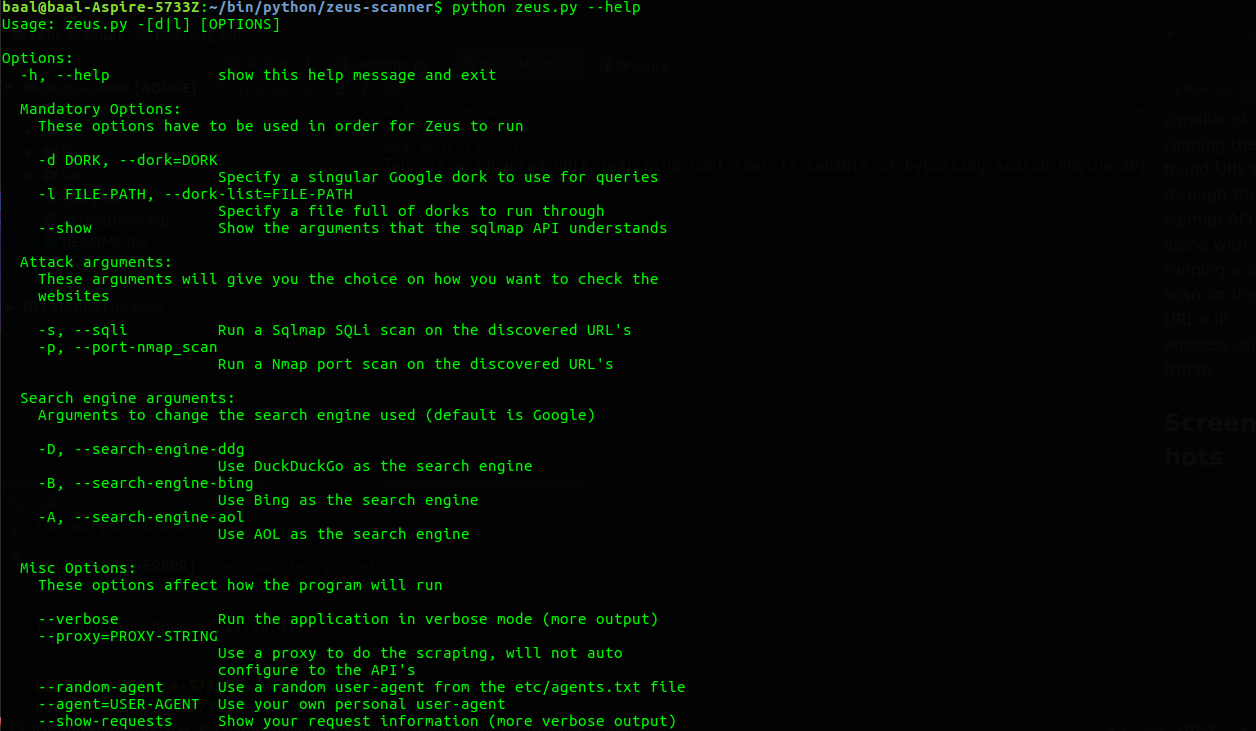
Running without a mandatory options, or running the --help flag will output Zeus's help menu:
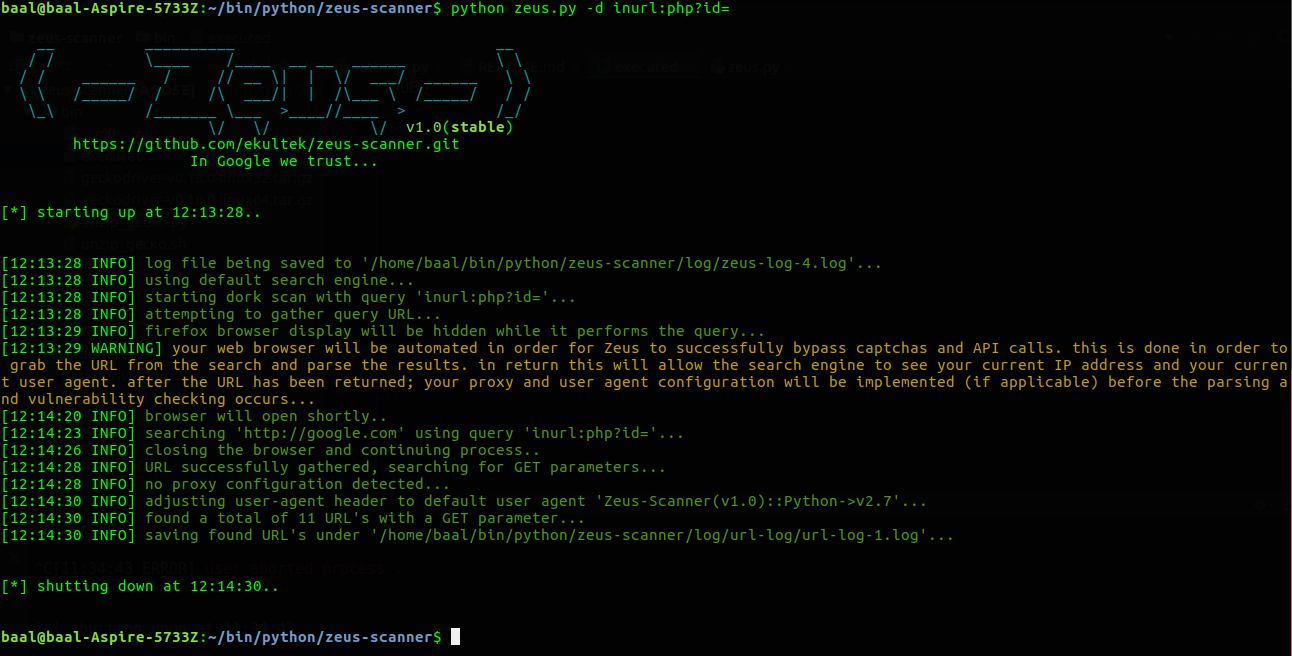
 A basic dork scan with the
 -d flag, from the given dork will launch an automated browser and pull the Google page results:
 Calling the
 -s flag will prompt for you to start the sqlmap API server python sqlmapapi.py -s from sqlmap, it will then connect to the API and perform a sqlmap scan on the found URL's.

You can see more screenshots here
Demo

Requirements
There are some requirements for this to be run successfully.
- You may need to run
sudo apt-get install libxml2-dev libxslt1-dev python-dev - Firefox web browser is required as of now, I will be adding the functionality of most web browsers.
- If you want to run sqlmap through the URL's you will need sqlmap somewhere on your system.
- If you want to run a port scan using nmap on the URL's IP addresses. You will need nmap on your system.
- Highly advised tip: Add sqlmap and nmap to your ENV PATH
- Gecko web driver is required and will be installed the first time you run. It will be added to your
/usr/binso that it can be run in your ENV PATH. - You must be
sudofor the first time running this so that you can add the driver to your PATH selenium-webdriverpackage is required to automate the web browser and bypass API calls.requestspackage is required to connect to the URL, and the sqlmap APIpython-nmappackage is required to run nmap on the URL's IP addresseswhichcraftpackage is required to check if nmap and sqlmap are on your system if you want to use thempyvirtualdisplaypackage is required to hide the browser display while finding the search URLxvfbis required by pyvirtualdisplay, it will be installed if not installed on your first runlxmlis required to parse XML data for the sitemap and save it as suchgoogle-api-python-clientis required to search via Google's API clientpsutilis required to search for running sqlmap API sessionshttplib2is required to allow user-agent changes during Google's API client searchesbeautifulsoupis required to pull all the HREF descriptor tags while using the blackwidow crawler
Installing
You can download the latest tar.gz, the latest zip, or you can find the current stable release here. Alternatively you can install the latest development version by following the below instructions:
- (optional but highly advised) add sqlmap and nmap to your environment PATH by moving them to
/usr/binor by adding them to the PATH via terminal
Ubuntu/Debian
sudo apt-get install libxml2-dev libxslt1-dev python-devgit clone https://github.com/Ekultek/Zeus-Scanner.gitcd zeus-scannersudo pip install -r requirements.txtsudo python zeus.py
centOS
sudo apt-get install gcc python-devel libxml2-dev libxslt1-dev python-devgit clone https://github.com/ekultek/zeus-scannercd zeus-scannersudo pip install -r requirements.txtsudo python zeus.py
Others
sudo apt-get install libxml2-dev libxslt1-dev python-devgit clone https://github.com/Ekultek/Zeus-Scanner.gitcd zeus-scannersudo pip install -r requirements.txtsudo python zeus.py
This will install all the package requirements along with the gecko web driver
Donations
Zeus is created by a small team of developers that have an aspiration for information security and a strive to succeed. If you like Zeus and want to donate to our funding, we gladly and appreciatively accept donations via:
- Bitcoin(BTC) via:
3DAQGcAQ194NGVs16Mmv75ip45CVuE8cZy - PayPal
- Or you can Buy me a coffee
You can be assured that all donations will go towards Zeus funding to make it more reliable and even better, thank you from the Zeus development team